Personal weblog of Ted Pavlic. Includes lots of MATLAB and LaTeX (computer typesetting) tips along with commentary on all things engineering and some things not. An endless effort to keep it on the simplex.
There's nothing worse than bad lighting on a video call or while recording a video. Experts will tell you that you should buy a nice ring light, which provides a nice diffuse glow on your face as you record. However, most ring lights are eyesores on a modern desk and are generally pretty inconvenient, especially if you regularly use a laptop as your recording rig. For example, a good quality ring lamp might require clamping onto the edge of a desk, which might not be ideal for your desk setup. Fortunately, I've found a cheap solution (far cheaper than most ring lights) that does a great job, is super portable, and looks great on a desk.
It is cheap (at the time of this post, it is $16.99 on Amazon and has an additional 10% coupon that can be applied), and it has an array of features that are great for any Zoom call or camera session in general. For example:
3 Lighting Modes (5000K, 4000K, and 3500K – pick your color temperatures for your complexion and camera)
Continuously dimmable (800 lumens max)
Diffuse disc of LED light (not a point source)
Flexible gooseneck and weighted base allows for tipping up to vertical
Uses a rechargeable battery, and so:
It can be plugged in continuously
It can be unplugged and moved for the best lighting experience (very portable!)
I don't know how long this little thing will last, but it seems pretty sturdy. My wife has an older version of what appears to be the same OEM product, and it is still going. I have several colleagues who have purchased this one after my recommendation, and they tell me it's working great for them.
My father needed a portable Bluetooth-capable MP3 player with large or expandable memory. Portable MP3 players with such features typically sell for $80+ (Trio mini), with the nicest units being at least $150 (iPod nano) or much more. The cheap models have terrible battery life (3 hours for Trio mini). Creative solution? He bought a no-contract LG Optimus Exceed 2 from Verizon Wireless for less than $50 at Best Buy and used a 16GB microSD card that he already owned.
LG Optimus Exceed 2, Prepaid (no-contract) Phone from Verizon Wireless
This particular no-contract phone is fast, runs Android 4.4.2, and can be used without activating. In fact, it is very easy to bypass the initial activation screen with a special key sequence – volume up, volume down, back, home – pressed after restart at the language selection screen. After bypassing that screen just once, the phone is happy to run unactivated indefinitely after that – it will never present that activate screen again. Use airplane mode to prevent phone from looking for a network to save battery, and flip on WiFi and Bluetooth. It's like a $50 iPod touch. Nice deal.
You can get this phone from a number of places, as shown in links below. Of course, there are other no-contract phone choices you could make (check all no-contract carriers – Boost Mobile, Virgin Mobile USA, T-Mobile, etc.). If you're willing to compromise on the phone software or other capabilities, you can get decent "MP3 player phones" for $30 or even $20.
For example, you can get essentially the same phone from Boost Mobile packaged as the LG Realm for only $35 on Amazon right now. It's $40 from other retailers.
LG Realm, Prepaid (no-contract) Phone from Boost Mobile
UPDATE #2: More competition has come onto the market. Check out the Snake ~ Chicago Snake lock solution. It looks a lot less scary (in terms of potential scratching) than the others, like macBracket. It's $20 and available from Amazon, where several pictures of how it works are shown. You can also find it at its home page.
UPDATE #1: It turns out this is not the only bracket available. As reviewed by MacGirl.net, there used to be a bracket sold on an eBay store that slid up through the MacBook Air. Unfortunately, not only was the locking portion in front of the screen, but it could slide around and scratch the device. Then came the macBracket out of Germany. The macBracket is pretty slick and looks like it is relatively gentle on the MacBook Air. It's a little pricey, but it's not like there's a lot of competition right now.
So if you need a good solution right now, check out the macBracket. Just make sure to order the correct version for your MacBook Air; they have support for new MacBook Airs (MBA). That new MBA bracket will be shipping soon (at the time of this posting), but it's available for order on their website.
I was surprised to hear that the MacBook Air has no Kensington lock slot. It's too small. Apparently, some of the PC ultrabooks also have this problem. Tablets have this problem, but it's easy to take tablets and phones with you... It's a little harder to carry the MacBook Air everywhere.
There are a ton of alarm solutions (like what you'd expect to see in a BestBuy) that rely on USB connectivity or adhesion or something similar. Those aren't really ideal. A lock is what is really needed. I've seen two locking solutions available for purchase, and both of them are a bit ugly.
The first, from MacLocks.com is a protective case which attaches to the bottom of the MacBook Air with screws. The protective case includes a Kensington lock slot, and so your MacBook Air can be locked down so long as the potential thief doesn't carry around the right screw driver (some sort of security star head or something like that). I suppose they could have used those non-removable screws that only support a driver in the clockwise direction (like in many bathroom stalls), but then you'd be out of luck if you ever wanted to get the case off of your MacBook Air.
The second, from JKLocks.com, has a few variations. I saw version RL108 on YouTube, but there are other versions on the company website. It uses 3M command strips to attach a Kensington lock slot to the back of the laptop. When the lock is connected, it covers the ends of the command strips so they cannot be removed. Of course, if you ever try to remove the command strips, you have to be very careful the metal base of the Kensington lock slot doesn't go scratching across the top of the laptop (!!).
So neither solution is really that good. But then I saw this YouTube video of the Air Snail, a prototype that was invented before either of those solutions were marketed (I think) and requires no screws or funny adhesives
That's genius! It is just an eared sickle that slides through the hole between the screen and the keyboard; the hinges and lock keep it from sliding out! Unfortunately, the inventor cannot find any partners willing to fabricate it in large quantities and market it. Sure, it would need to be built so it could be tough while not scratching the device (and would need to be fabricated for relatively cheap). However, I think those challenges are not insurmountable.
So do you have some dough laying around and want to market a great idea? If so, contact the inventor and start selling these things! Get them out before there are a lot of ultrabooks on the market -- I'm guessing there will be a demand for this little portable toy!
Meanwhile, you could probably fabricate something similar yourself (e.g., with some coated aircraft cable thin enough to slide through the MacBook Air). It might be hard to make it compatible with a Kensington lock without some fabrication, but you could surely make it compatible with a padlock.
Interesting and slightly amusing letter from IEEE Spectrum Editor-in-Chief Susan Hassler:
Dear Members and Readers,
Please accept our sincere apologies for the headline in today's Tech Alert: "With the Arduino, Now Even Your Mom Can Program." The actual title of the article is "The Making of Arduino."
I'm an IEEE member, and a mom, and the headline was inexcusable, a lazy, sexist cliché that should have never seen the light of day. Today we are instituting an additional headline review process that will apply to all future Tech Alerts so that such insipid and offensive headlines never find their way into your in-box.
Spectrum's insistence on editorial excellence applies to all its products, including e-mail alerts. Thank you for bringing this error to our attention. If you have any additional comments or recommendations, do not hesitate to contact me or other members of the editorial staff.
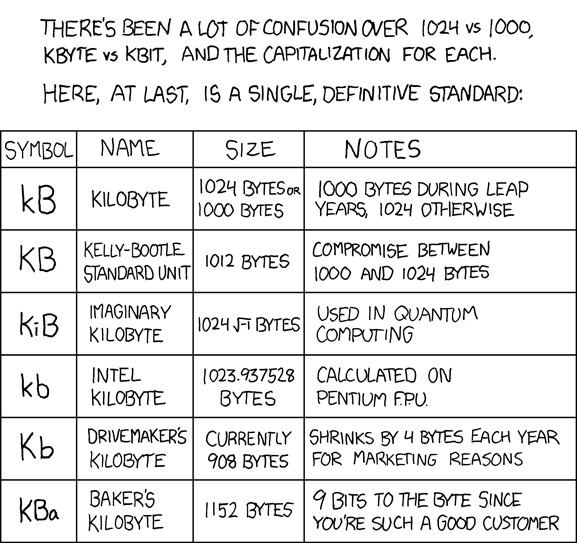
On a serious note, "kB" is "kilobyte" and "kb" is "kilobit." An uppercase "K" is "Kelvin," and so it should never be paired with either "B" or "b". For most modern machines, a "B"yte is 8 "b"its, but there is NO GOOD REASON to assume this case. The meaning of "kilo" is context-dependent, though it's computationally convenient to use 1024 rather than the standard 1000 (because computers address things in base-2).
"Agent 191" doesn't understand "Reply-To" and delegating of support messages.
"Agent 191" might think that my message was some internal joke played on her by other people at Geek Squad.
Either way, "Agent 191" looks a bit like an idiot or an ass (or both). When you see those Geek Squad commercials, these are the people you're dealing with.
I sent a snarky response back (one to info, and one to Agent 191 directly), but I haven't received anything else. So, now when I teach classes to my young engineers, I refer to "Geek Squad" where I used to say "lay people." Snap! (or something)
An e-mail I just sent to Geek squad:
Subject: Complaint: Packaging information of CAT-6 crossover cable
"Geek" squad --
I purchased a CAT-6 crossover cable of yours yesterday. The packaging surprised me. You advertise yourselves as some sort of elite group of geeks, but the printing on the packaging makes me wonder if any of you know anything about technology at all.
There are several examples on the front of the package, but one sentence in particular is especially troubling:
"Your geek squad network crossover cable uses an RJ45 connection allowing you to connect between similar types of equipment without the use of a hub; one PC to another PC for example."
The difference between a crossover cable and a standard patch cable has nothing to do with the "RJ45 connection." For one, both cables use a type-45 "registered jack (RJ)". "RJ45" describes the PHYSICAL connector. That is, it describes the PLASTIC end that mechanically snaps into place when the male version is inserted into the female version.
The difference between a crossover cable and a standard patch cable is the 8P8C (i.e., "8 position 8 contact") termination type. A patch cable has a T568A termination at one end and a T568B termination at the other end.
It would be wise for you to change the wording to something like:
"Your geek squad network crossover cable uses an T568A-to-T568B termination allowing you to connect between similar types of equipment without the use of a hub; one PC to another PC for example."
Otherwise, it just simply doesn't look like you know what you're doing.
When I picked up the cable and saw the text above, I was seriously worried that it would have the 500 MHz bandwidth I needed. Unfortunately, because it was the only one available and I didn't want to terminate my own and risk the crosstalk, I had to buy your expensive cable. My computers came up with gigabit link, so I'm guessing things are fine, but I wonder what I'd find if I walked down the hall and tested these things on a network analyzer.
Clean up your act, Geek squad.
Thanks for your understanding -- Ted Pavlic
A bit much? (yes, I realize there's a typo... I said "patch" once where I clearly meant "crossover")
‘WiTricity’ can light up lamps and laptops; system touted as safe, efficient
Power cables and even batteries might become a thing of the past using a new technique that can transmit power wirelessly to cell phones, laptops, MP3 players, household robots and other electronics.
Scientists lit a 60-watt light bulb from a power source 7 feet (2 meters) away with their new technique, with no physical connection between the source and the appliance. The researchers have dubbed their concept "WiTricity," as in "wireless electricity."
Soljacic and his colleagues devised WiTricity based off the notion of resonance. One well-known example of resonance can be seen when an opera singer hits the right note to cause a champagne glass to resonate and shatter. Two objects resonating at the same frequency tend to exchange energy efficiently, while interacting weakly with objects not resonating at the same frequency.
Instead of sound, the MIT physicists focused on magnetic fields. Most common materials interact only very weakly with magnetic fields, so little power would get wasted on unintended targets. "The fact that magnetic fields interact so weakly with biological organisms is also important for safety considerations," said Soljacic's colleague, MIT physicist Andre Kurs.